

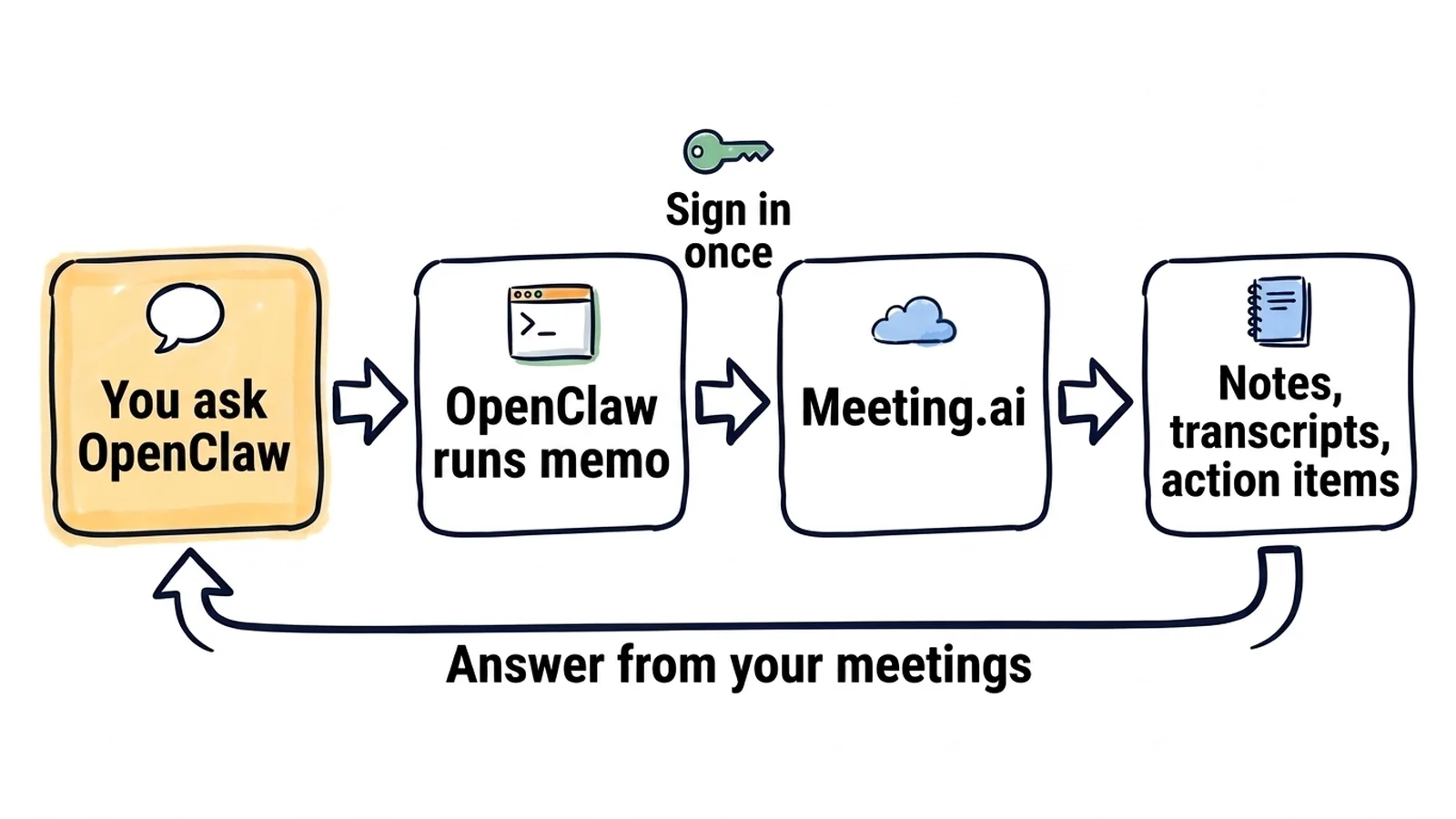
Meeting.ai records your meetings and writes the notes, a transcript and the action items. Connect it to OpenClaw and your assistant answers from those meetings in chat, and sends you the week's action items every Friday.
The link between the two is memo, the Meeting.ai command line: one binary on the gateway host, set up with three commands and no API key. It prints its data as JSON (exports return the format you ask for) and never stops to ask a question, so an agent can run it while you are away, including the commands that change real data (see "Good to know").
Friday at 16:00, the week's action items arrive in Telegram. You wrote the request once, in one openclaw automations create command. The meetings in the samples on this page are invented.
Action items, 12–16 October

Priya
- Send Halden the revised SLA draft (due 20 Oct, "Halden weekly")

Tomas
- Rotate the staging database credentials (due 21 Oct, "Infra review")

Ines
- Reply to the two backend candidates (due 19 Oct, "Hiring sync")

No owner
- Decide who writes the migration runbook ("Infra review")
Walking to a client call, you ask from your phone:
What did we promise Halden in our last two calls?
OpenClaw searches your meetings, reads the notes and answers:
Promised to Halden
- Revised SLA draft by 20 Oct (Priya), from the call on 13 Oct
- A named contact for incidents, from the call on 6 Oct

Still open: they asked about EU data residency and nobody answered.
At 07:30 on weekdays, a brief arrives before your first call. For each event on today's calendar, it says what you decided last time and what is still open.
How do you connect Meeting.ai to OpenClaw?
You need a running OpenClaw Gateway on macOS or Linux, on arm64 or amd64, and a Meeting.ai account with at least one workspace, which is Meeting.ai's word for a team. On Windows, run the Gateway in WSL2. If the account has no meetings yet, record or upload one first.
Run these on the gateway host:
curl -fsSL https://raw.githubusercontent.com/meeting-ai/memo-cli/main/install.sh | bashThen open a new terminal, so your shell finds memo in ~/.local/bin, and run:
memo auth login
memo install-skill-md- Install memo. The first command downloads the release for your platform, checks its SHA-256 checksum, and puts
memoin~/.local/bin. You can read the installer before you run it. - Sign in.
memo auth loginopens Meeting.ai in your browser and stores the session on the host. - Install the skill.
memo install-skill-mdwritesSKILL.mdto~/.openclaw/skills/memo/, OpenClaw's managed skills folder. The installer already tries this; running it again does no harm. - Check that OpenClaw sees it. Run
openclaw skills list. In a chat session that is already open, send/newso the agent receives the refreshed skill list. - Ask. Message your assistant: "Use memo to list my five most recent meetings." If the titles are yours, it works.
No browser on the gateway host? In step 2, run memo auth login email --email [email protected] and follow the steps it prints: Meeting.ai emails you a code. In step 4, openclaw skills info memo works as well.
If OpenClaw cannot find memo
OpenClaw runs memo with its exec tool, and the OpenClaw daemon starts with a minimal PATH. If the agent reports that memo is not found, add ~/.local/bin to the tools.exec.pathPrepend list in your OpenClaw configuration:
{
  tools: {
    exec: {
      pathPrepend: ["~/.local/bin"],
    },
  },
}
If you have turned on OpenClaw's sandbox, the binary must also exist inside the container. OpenClaw's skill documentation covers how to install a binary there.
A digest on a schedule
OpenClaw's built-in scheduler is called automations. A job is a cron expression, a prompt, a time zone and a chat to deliver to. Both commands here are put together from OpenClaw's documented flags. This one sends the Friday list:
openclaw automations create "0 16 * * 5" \
  "Use memo to list my meetings since Monday. For each one read the action items. Send me one list grouped by owner, with the due date and the meeting each item came from. Mark items with no owner." \
  --name "Friday action items" \
  --tz "Asia/Jakarta" \
  --session isolated \
  --announce --channel telegram --to "<your chat id>"
OpenClaw does not accept phrases such as "every day at 9am"; write 0 9 * * * and set --tz. Replace the values of --tz, --channel and --to with your own time zone and chat.
The morning brief is the same command with a weekday schedule and another prompt. It reads today's events, so it needs a calendar connected in Meeting.ai:
openclaw automations create "30 7 * * 1-5" \
  "Use memo to list today's calendar events. For each one, search my past meetings for the same title and tell me what we decided last time and what is still open. Keep it to one screen." \
  --name "Morning brief" \
  --tz "Asia/Jakarta" \
  --session isolated \
  --announce --channel telegram --to "<your chat id>"
For a monthly summary, use the schedule 0 8 1 * * and the prompt "Use memo to summarise last month's project meetings into a Markdown file in your working folder." As the agent's owner, you can later ask in chat to list, change or remove automations.
Good to know
- We have not run this setup inside OpenClaw ourselves. We checked every
memocommand against memo 0.19.2 and wrote the OpenClaw steps from OpenClaw's documentation on 14 October 2026, so write to [email protected] if a step looks different on your machine. - Commands run without approval by default. OpenClaw's host
execruns commands with no prompt unless you changetools.exec.mode, and thememocommands that create a meeting, edit notes, share or delete change real data. - Scheduled prompts start fresh. With
--session isolatedthe job runs in a new session, so write the whole instruction into the prompt, including "use memo". - Anyone who can message the agent can ask about your meetings.
memosigns in as you and reaches the workspaces your Meeting.ai account can access. Keep the agent's channels and pairing limited to you, and deliver a digest only to a chat where every reader should see it. - Reading is included. Signing in and reading need no extra purchase while your plan gives you access to the meeting. Recording, Visual Notes (a meeting as one image) and media generation such as images or audio use your Meeting.ai subscription or Coins, the credits in your account.
Things to ask
To call the skill directly, send /skill memo followed by your request.
The follow-up email after a call
You have just left a client call.
What did we decide in the client call that just ended? Draft the follow-up email and keep it under 150 words.
OpenClaw runs memo meetings list, reads the latest meeting's notes and sends back the decisions and a draft you can forward. Notes take a little while to process after a call; memo meetings progress shows how far the processing has got.
A notetaker for a call that starts now
A customer sends an invite with five minutes' notice.
Send the Meeting Bot to this call now: [paste the Zoom, Google Meet or Microsoft Teams link]
OpenClaw runs memo meetings create --url <link> --confirm, and the Meeting Bot, the Meeting.ai notetaker, joins the call and records it. --confirm marks the action as one you asked for; without it, memo creates nothing and reports that it is waiting for confirmation.
One word across a quarter of meetings
Renewals are due next month and you want to know what each customer said about them.
Search this quarter's meetings for "renewal" and list what each customer said.
OpenClaw runs memo meetings search with that keyword. You get the matching meetings with the relevant lines from each.
More things to ask
- The Meeting Bot on tomorrow's call. "Make the Meeting Bot join tomorrow's 10:00 call with the Halden team." OpenClaw updates the calendar event, so this needs the connected calendar too.
- A PDF of the notes. "Export the notes of today's board prep as a PDF into your working folder." The file is written by
memo meetings export. - A Visual Note. "Turn this afternoon's workshop into a one-page Visual Note."
- What someone actually said. "Quote what Tomas said about the credential rotation in Tuesday's infra review." OpenClaw reads the transcript for this one.
- Every meeting with one person. "List the meetings Ines was in this month, with one line on what each was about."
- Items nobody owns. "Which action items from last month still have no owner?"
Why can OpenClaw not read my meetings?
Usually memo is not on the agent's path, the session never loaded the skill, or the sign-in did not finish.
| What you see | What to do |
|---|---|
memo is not found | See "If OpenClaw cannot find memo" above |
| Skill not listed | Run memo install-skill-md, then start a new session with /new |
| Skill still not loaded | The memo skill file is about 100 KB. Check that skills.limits.maxSkillFileBytes allows it |
| Not signed in | Run memo auth status on the gateway host, then memo auth login or the email code sign-in |
| No meeting found | Check the workspace: run memo workspace list and switch with memo workspace set |
| Automation never fires | Check that the Gateway is running and that the expression and --tz are what you meant |
| Empty balance reported | That action needs a subscription or Coins |
memo says the meeting is locked | The meeting's workspace has no subscription or Coins that cover it anymore. Restore them to read it again; for a meeting someone shared with you, its owner has to |
MCP instead of the CLI
Use the CLI for now. OpenClaw can register a remote MCP server and sign in with OAuth:
openclaw mcp set meeting-ai '{"url":"https://mcp.meeting.ai/mcp","transport":"streamable-http","auth":"oauth"}'
openclaw mcp login meeting-ai
The syntax matches OpenClaw's documentation. The sign-in is the open point: OpenClaw's documentation describes dynamic client registration, and the Meeting.ai server does not offer it. It identifies clients with Client ID Metadata Documents. We have not confirmed that openclaw mcp login completes against it, so treat these two commands as an experiment and the CLI as the route this guide documents.
How do you disconnect Meeting.ai from OpenClaw?
Run memo auth logout on the gateway host to end the session, and memo install-skill-md --uninstall to remove the skill file. Remove any automations that call memo. To end the session from the Meeting.ai side, open Settings › MCP & CLI and revoke it. Revocation takes effect immediately.
Start small
Ask OpenClaw for your five most recent meetings, then create the Friday automation. The Meeting.ai CLI page and the CLI guide cover the commands in more detail.
Guides for other agents and assistants:
- Another agent you run yourself: Hermes Agent
- In your editor or terminal: Cursor, Claude Code and Codex
- In a chat app: ChatGPT and Claude