

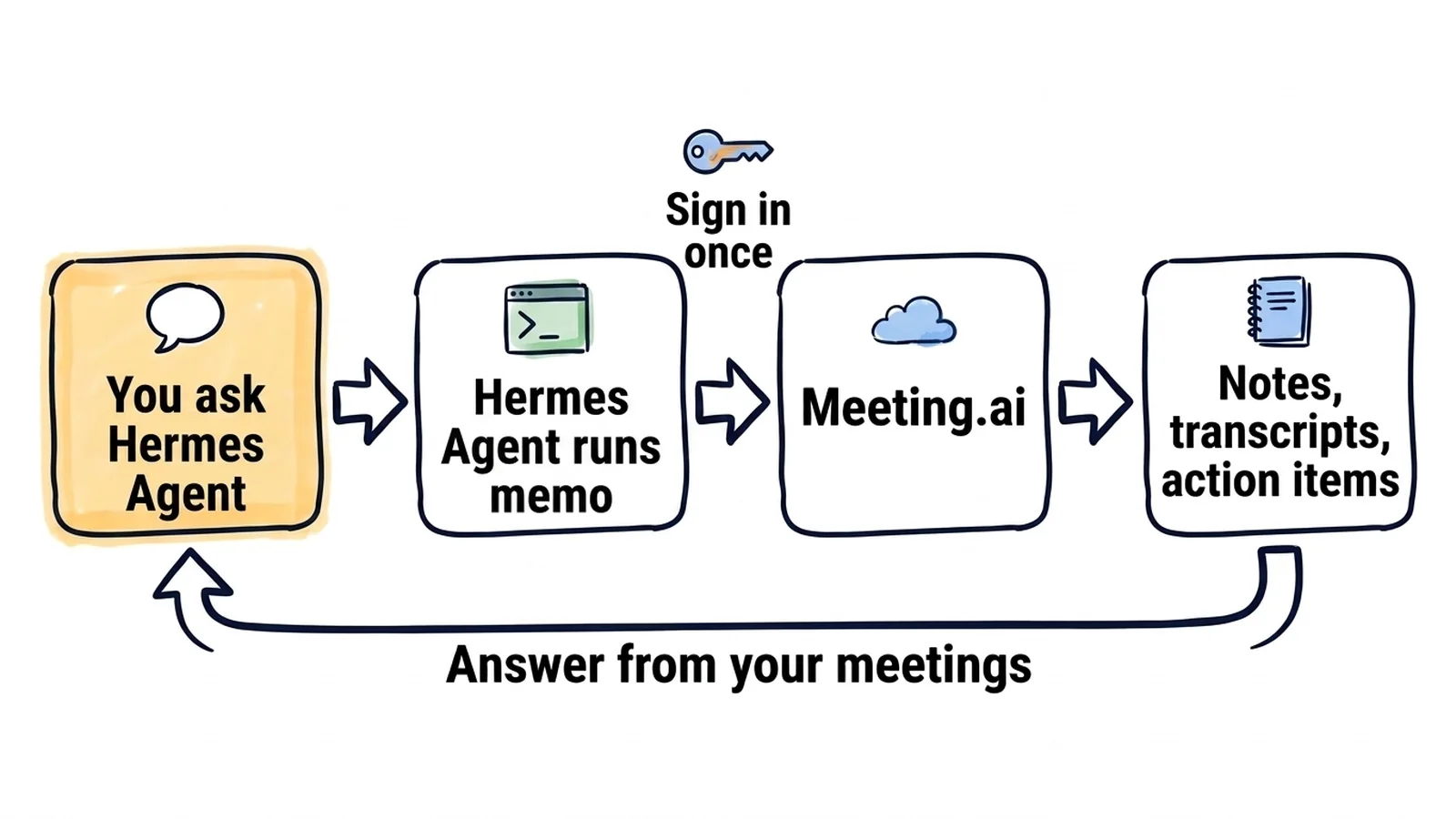
Meeting.ai is a meeting notetaker: its Meeting Bot joins your Zoom, Google Meet or Microsoft Teams calls and records them, and Meeting.ai writes the transcript, the notes and the action items. Install its command line, memo, next to Hermes Agent and the agent can read all of that. You ask it about a call in chat, or a cron job sends you a digest on Telegram.
This works for meetings that are in Meeting.ai, recorded or uploaded. Setup is three commands, one of them the sign-in. There is no API key, and reading notes and transcripts needs no extra purchase while your plan gives you access to the meeting.
Every Friday at 16:00, the week's action items arrive on Telegram. One command creates the job:
hermes cron create "0 16 * * 5" \
  "Use memo to list my meetings since Monday. For each one read the action items. Write one list grouped by owner, with the due date and the meeting each item came from. Mark items with no owner." \
  --name "Friday action items" \
  --deliver telegram
Hermes Agent's gateway daemon runs the job each Friday and delivers the result to your Telegram home channel, the chat set as TELEGRAM_HOME_CHANNEL when you connect Telegram to Hermes Agent. The message below is an illustration with made-up meetings, as is every sample answer on this page.
Action items, 12–16 October

Priya
- Send Northwind the migration plan (due 19 Oct, "Northwind onboarding")
- Review the on-call rota (due 21 Oct, "Platform sync")

Tomas
- Renew the staging certificates (due 19 Oct, "Platform sync")

Elif
- Share the Q4 hiring plan (due 23 Oct, "Leads weekly")

No owner
- Decide who pays for the load test ("Northwind onboarding")
Every weekday at 07:00, a brief before your meetings. A second job, shown further down, lists today's calendar events and tells you what each meeting decided last time and what is still open.
Any time, you ask about a past call. In chat:
Use memo to find my last call with Northwind. What discount did we agree, and who still has to approve it?
The agent searches your meetings, reads the notes of that call and answers, for example: 12% on the annual plan, waiting for approval from their finance lead.
How do you connect Meeting.ai to Hermes Agent?
Run three commands on the machine where Hermes Agent runs. After the sign-in, memo commands print JSON and do not prompt, so they run unattended.
You need Hermes Agent on macOS or Linux, on its default local terminal backend. On Windows, run Hermes Agent in WSL2. If you have no meetings in Meeting.ai yet, record or upload one first.
curl -fsSL https://raw.githubusercontent.com/meeting-ai/memo-cli/main/install.sh | bashThen open a new terminal, so your shell finds memo in ~/.local/bin, and run:
memo auth login
memo install-skill-md- Install memo. The first command downloads the release for your platform (arm64 or amd64), checks its SHA-256 checksum, and puts
memoin~/.local/bin. You can read the installer before you run it. - Sign in. On a server without a browser, run
memo auth login email --email [email protected]and follow the steps it prints: Meeting.ai emails you a code. On a machine with a browser,memo auth loginopens Meeting.ai there. The CLI signs in as you, with access to the same workspaces as your Meeting.ai account. - Install the skill.
memo install-skill-mdwritesSKILL.mdto~/.hermes/skills/memo/. That file teaches Hermes Agent the commands. The installer already attempts this, and running it again does no harm. - Check that Hermes Agent sees it. Run
hermes skills listand look for memo. In a session that was already open, send/reload-skills. - Ask. Tell the agent: "Use memo to list my five most recent meetings." If the titles match what you see in Meeting.ai, it works.
Put it on a schedule
The Friday job at the top is created from the terminal. The morning brief is created from chat. Both commands are put together from Hermes Agent's documented flags.
/cron add "0 7 * * 1-5" "Use memo to list today's calendar events. For each one, search my past meetings for the same title and tell me what we decided last time and what is still open. Keep it to one screen."Run it in a chat with your agent, for example in Telegram, and the brief comes back to that chat; a job created from the terminal saves its output to local files unless you pass --deliver. The brief needs a calendar connected in Meeting.ai.
You can also describe a schedule in plain language, and Hermes Agent turns the request into a scheduled task: "Every Friday at 4pm, use memo to collect this week's action items and send them to me on Telegram." A monthly one works the same way: "On the first of every month, use memo to summarise last month's project meetings and send me the summary on Telegram."
Good to know
- These steps come from the documentation. We wrote them from Hermes Agent's documentation and memo 0.19.2, and have not run the setup inside Hermes Agent ourselves; write to [email protected] if a step differs on your machine. The MCP route should work, but we have not run it.
- Only dangerous commands ask for approval. In its default
smartmode Hermes Agent checks each command against a list of dangerous patterns and runs the rest. Mostmemocommands only read; the ones that create a meeting, edit notes, share or delete change real data. - Scheduled prompts must be self-contained. A cron job runs in a fresh session with no memory of your chat, so write the whole instruction into the job, including "use memo".
- Cron needs the gateway. The gateway daemon runs scheduled jobs and messaging, and if it is not running, nothing fires. Times are the server's local time unless you set
timezonein~/.hermes/config.yaml. - Stay on the local backend. With a container backend, commands run in a container that does not have your host's
memoor its sign-in unless you mount them. - Recording and Visual Notes use your plan. Recording a call with the Meeting Bot and drawing a Visual Note use your Meeting.ai subscription or Coins, the credits in your Meeting.ai account. That includes the ones your agent starts.
- Limit who can message the agent. Your meetings include what other people said. Restrict who may message your agent, and send digests only to chats whose members should see them.
Things to ask in chat
The follow-up email, from your phone
What did we decide in the client call that just ended? Draft the follow-up email and keep it under 150 words.
Hermes Agent finds the latest meeting with memo meetings list, reads its notes, and replies in the same chat with the decisions and a draft you can forward. Notes are not ready the moment a call ends; memo meetings progress shows the processing state.
A recorder for a call that is about to start
Send the Meeting Bot to this call now: [paste the Zoom, Google Meet or Microsoft Teams link]
The Meeting Bot joins the call and records it. The command behind this is memo meetings create --url <link> --confirm. The --confirm flag marks the action as one you asked for; without it, memo answers that it is waiting for confirmation.
One word across a quarter of meetings
Search this quarter's meetings for "renewal" and list what each customer said.
You get the matching meetings with the relevant lines from each. The search itself is memo meetings search.
More things to ask
- The exact words. "In Tuesday's platform sync, what exactly did we say about the staging certificates? Quote the transcript."
- One person's side of a meeting. "List everything Priya said in the Northwind onboarding call."
- Everything with one person. "Find Jonas in my contacts and list every meeting we had this year, with one line on what each was about." Contacts are the people from your meetings.
- Notes as a file. "Export the notes of today's board prep as Markdown into my notes folder." The agent writes the file with
memo meetings export. - A recorder booked ahead. "Make the Meeting Bot join tomorrow's 10:00 call with the Northwind team." The agent updates the calendar event so the Meeting Bot joins. This needs a calendar connected in Meeting.ai.
- The end of a recording. "Stop recording the call I sent the Meeting Bot to."
- A Visual Note. "Turn this afternoon's workshop into a one-page Visual Note." A Visual Note is a one-page drawing of the meeting, and you get it as an image.
Why can Hermes Agent not read my meetings?
Check three things first: the skill is loaded, the sign-in finished, and the agent is on the local backend.
| What you see | What to do |
|---|---|
| Skill missing | Run memo install-skill-md, then send /reload-skills or start a new session |
memo not found | Check that ~/.local/bin is on the path of a non-interactive shell. If you installed memo after the gateway, run hermes gateway install again so it captures your current path |
| Not signed in | Run memo auth status, then memo auth login or the email code sign-in |
| Works in your shell only | The agent is probably on a container backend. Switch terminal.backend to local |
| No meeting found | memo looks in one workspace (team) at a time. Run memo workspace list and switch with memo workspace set |
| A job never runs | Check hermes cron status and that the gateway daemon is running |
| Empty-balance error | That action needs a subscription or Coins |
memo says the meeting is locked | The meeting's workspace has no subscription or Coins that cover it anymore. Restore them to read it again; for a meeting someone shared with you, its owner has to |
The MCP route
Hermes Agent also connects to MCP servers, and the Meeting.ai MCP server offers one thing the CLI steps above do not cover: the live notes and the transcript so far, while the Meeting Bot is still in a call.
Per its documentation, Hermes Agent identifies itself to a server automatically, with a Client ID Metadata Document, and the Meeting.ai server supports that method. You add the server to ~/.hermes/config.yaml:
mcp_servers:
  meeting-ai:
    url: "https://mcp.meeting.ai/mcp"
    auth: oauth
Then run hermes mcp login meeting-ai from a fresh terminal, approve the connection in the browser, and start a new session or send /reload-mcp. A connection made this way is listed under Connected MCP Client in Meeting.ai, where you can revoke it.
How do you disconnect Meeting.ai from Hermes Agent?
Run memo auth logout to end the session and memo install-skill-md --uninstall to remove the skill file. Then remove the cron jobs that call memo. To end the session from the Meeting.ai side, open Settings › MCP & CLI and revoke it. Revocation takes effect immediately.
Start with Friday's digest
Run the three commands, create the Friday job, and check Telegram at 16:00. The Meeting.ai CLI page and the CLI guide cover the commands in more detail.
Guides for other agents and assistants: