
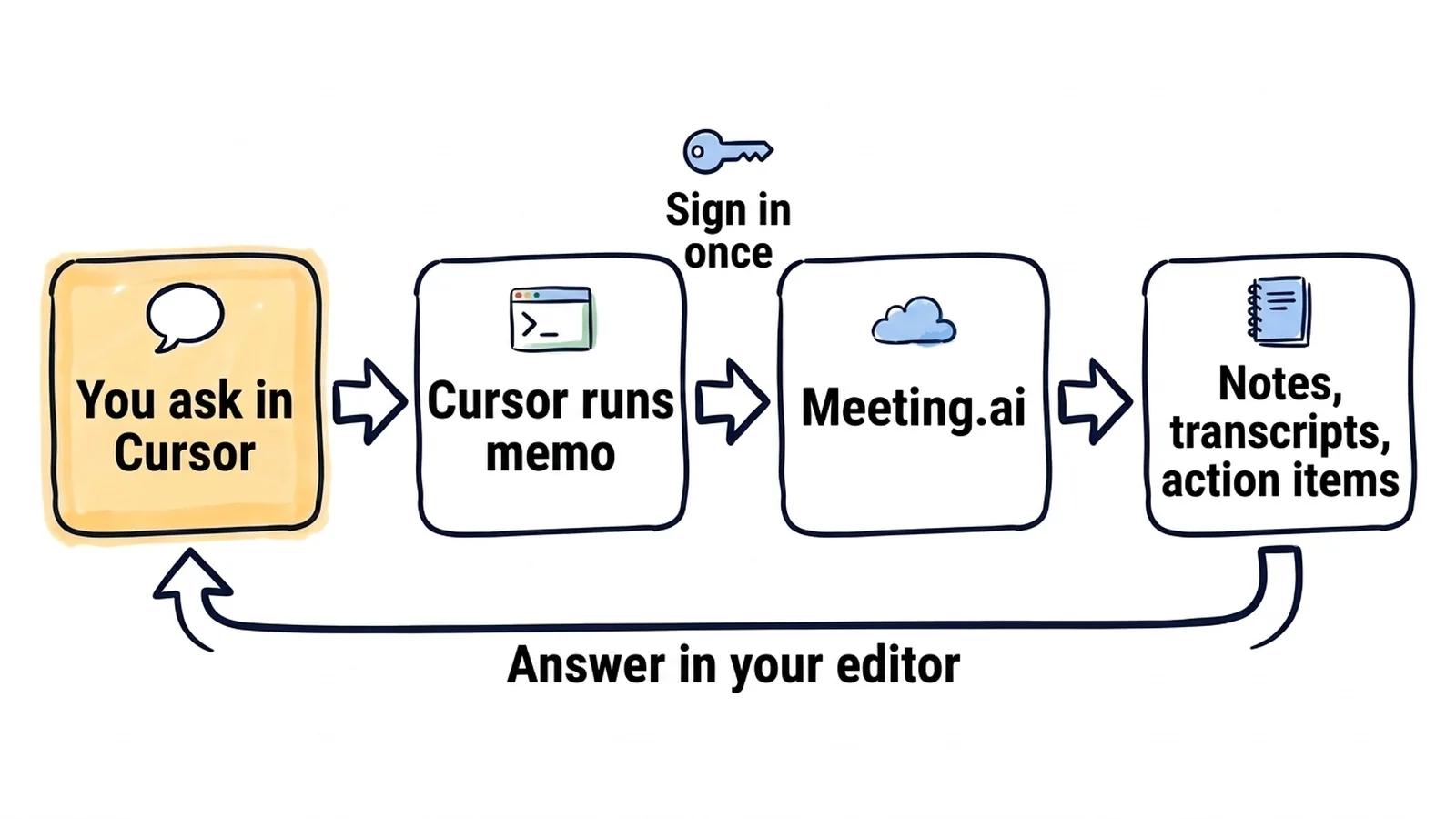
Install one CLI, and Cursor's Agent reads what your team decided in a meeting while it works in your repository. You stop pasting meeting notes into the chat.
It works for meetings that Meeting.ai has recorded. Meeting.ai records your calls and writes the notes and the transcript, and Agent reads them through memo, the Meeting.ai CLI. This route is a CLI that Agent runs in the terminal, not an MCP server; the reason is near the end. memo prints its data as JSON (exports return the format you ask for) and never stops to ask a question. Setup is two commands and one browser sign-in. There is no API key.
The meetings and answers below are invented examples.
You are about to change a number that looks arbitrary. The sync worker retries five times. Three seems plenty.
Before I lower MAX_ATTEMPTS in workers/sync/retry.py: use memo to find the meeting where we settled on five attempts, and tell me why.
Agent finds the incident review from 22 September and quotes the reason: the partner API takes up to four minutes to fail over, and five attempts with backoff cover that window. So five stays.
The ticket says "add empty and error states", and the details were agreed on a call. You sat in the design review last Thursday and remember about half of it.
Use memo to find Thursday's design review of the invoice list. Search the transcript for what we agreed about the empty and error states. Implement them in src/billing/InvoiceList.tsx, and show me the rules you found before you edit.
Agent runs memo meetings search and memo meetings get, reads the JSON, and reports before it touches the file:
From "Invoice list design review" (8 October):
1. Empty state: one line of help text and a single "Import invoices" button.
2. Error state: keep the table header, show the error in a banner with "Retry".
3. Loading: skeleton rows, no spinner.

Not decided: whether the banner links to the status page.

Plan: edit src/billing/InvoiceList.tsx, add InvoiceList.test.tsx. Proceed?
A customer showed the bug on a call, and nobody wrote a ticket.
Use memo to find last week's call with Northwind about the timesheet import. Extract the steps they followed and what they expected. Write a failing test in tests/import/ that reproduces it, then stop.
The test uploads the same file twice and fails because every row is doubled, which is what the customer said on the call.
How do you connect Meeting.ai to Cursor?
You need Cursor with Agent, macOS or Linux, and a Meeting.ai account with a meeting in it. If the account is empty, record or upload a meeting first. Then run these in a terminal:
curl -fsSL https://raw.githubusercontent.com/meeting-ai/memo-cli/main/install.sh | bashThen open a new terminal, so your shell finds memo in ~/.local/bin, and run:
memo auth login- Install memo. The first command downloads the release for your platform, checks its SHA-256 checksum, puts
memoin~/.local/bin, and installs a skill file, a Markdown file that tells Agent whichmemocommands exist. You can read the installer before you run it. - Sign in.
memo auth loginopens Meeting.ai in your browser. Sign in and approve; nothing needs to be pasted back. From then onmemoacts as you and reaches the workspaces your Meeting.ai account can access. - Check the session. Run
memo auth status. If you belong to several workspaces, runmemo workspace list, thenmemo workspace setwith the workspace id. - Check the skill. Run
memo install-skill-md --list. It shows~/.agents/skills/memo/SKILL.md, and Cursor loads skills from~/.agents/skills. In Cursor, open Customize in the sidebar and go to Skills to see it. - Ask Agent. Open Agent and type: "Use memo to list my five most recent meetings, then show me the decisions from the latest one." Check the answer against the meeting page in Meeting.ai.
If the skill is missing in step 4, run memo install-skill-md and restart Cursor. To call the skill directly, type / in Agent chat and search for memo.
Let Cursor run memo without asking every time
You set when terminal commands run in Settings > Agents > Approvals & Execution. In the default mode, Auto-review, memo cannot run in the sandbox, because the sandbox blocks network access and memo needs the network. Cursor can then ask you to approve the command.
To stop the prompts for read commands, add the ones you use to your terminal allowlist in Cursor Settings, for example memo meetings list, memo meetings search and memo meetings get. An entry matches by prefix, so a bare memo entry would also let commands that share or delete run without a prompt. Teams that keep the allowlist in a file can use the terminalAllowlist field of .cursor/permissions.json; when that file sets an allowlist, it replaces the one in Cursor Settings.
Good to know
- How these steps were checked. We wrote them from Cursor's documentation as read on 14 October 2026 and from memo 0.19.2, and have not run the whole setup inside Cursor ourselves, so write to [email protected] if a step looks different on your machine.
- What it costs. Signing in and reading notes and transcripts need no extra purchase while your plan gives you access to the meeting. Recording, Visual Notes (one-page drawings of a meeting) and media generation use your Meeting.ai subscription or Coins, the credits in your account.
- Read the command before you approve it. Most
memocommands only read; the ones that create a meeting, edit notes, share or delete change real data. Without--confirm,memo meetings createwaits for confirmation instead of creating the meeting, and Agent should add the flag only when you asked for exactly that action. - Notes first, then quotes. A full transcript is long, so ask for the notes and the action items, then have Agent search the transcript for the detail you need. A spoken decision can be vague or reversed later in the same call, so ask for the quoted lines and for what was left open.
- Keep transcripts out of the repository. Decisions belong in a PR description or a decision record. Raw transcripts with colleagues' words do not belong in a commit.
- macOS, Linux and the local Agent only.
memoinstalls on macOS and Linux (arm64 and amd64) and inside WSL, which we have not tried with the Cursor desktop app; there is no Windows build. Cursor's documentation says skills in~/.agents/skillsare not copied to Cloud Agents or remote workers, so use the local Agent.
Things to ask once Meeting.ai is connected
Put "use memo" in the prompt and name the meeting, so Agent goes to the right one.
The planning meeting as a file you can commit
Monday's planning call produced eleven tasks and a rough order. By Wednesday nobody agrees on the order.
Use memo to read Monday's planning meeting and write the tasks into docs/plan.md, ordered by dependency, with the owner named in the meeting.
1. Add the api_keys table (Priya)
2. Key creation endpoint (Tomas), after 1
3. Settings screen for keys (Wen), after 2
...
No owner named in the meeting: rate limiting per key.
The branch, checked against what was agreed
The branch is ready. Before you ask for a review, you want to know whether it does what the API review said.
Use memo to find the API review meeting. Compare this branch with what we agreed there. List every difference and quote the transcript line.
Branch feature/api-keys against "API review" (6 October): 2 differences

1. Key prefix. Branch: "sk_". Agreed: "mk_live_" and "mk_test_".
   "Test keys should be impossible to mistake for live ones."
2. Expiry. Branch: keys never expire. Agreed: 90 days by default.
   "Ninety days, and the owner can extend it."

Matches: scopes per key, secret shown once.
A PR description that says why
Half your reviewers were not in the call, and the diff does not explain itself.
Use memo to find the API review meeting. Write the PR description for this branch and give the decision behind each change.
- Keys expire after 90 days by default. Decided in the API review on 6 October.
- Test keys start with "mk_test_", so nobody mistakes one for a live key.
More things to ask
- A decision record. "Use memo to read last Wednesday's architecture meeting and write docs/adr/0012-job-queue.md: context, decision, rejected options."
- Prep for a review. "Use memo to list tomorrow's calendar events. For the design review, summarise what this branch changes and the open questions from the last review." Needs a calendar connected in Meeting.ai.
- Retro follow-up. "Use memo to read the last retro. Which action items touch this repository, and which are still not done?"
- Requirements from a month of meetings. "Use memo to search this month's meetings for 'pricing page'. Write the requirements into docs/pricing-requirements.md and mark the ones that conflict."
- Release notes. "Use memo to read this sprint's planning and review meetings. Write release notes and name the meeting behind each item."
- Notes as a Markdown file. "Use memo to export today's incident review as Markdown into docs/incidents/: notes and action items, no transcript." Agent runs
memo meetings exportwith--include sections,key-points: sections are the notes, key points the action items. - A notetaker for the next call. "Use memo to send the Meeting Bot to this call: [paste the Zoom, Google Meet or Microsoft Teams link]." This one acts instead of reading: Agent runs
memo meetings create --url <link> --confirm, and the Meeting Bot, the Meeting.ai notetaker, joins the call and records it.
Why can Cursor not find my meetings?
Usually Cursor did not run the command, or memo is not signed in.
| What you see | What to do |
|---|---|
Agent answers without running memo | Say "use memo" in the prompt, or type / and pick the memo skill |
| Cursor blocks the command | Approve it when Cursor asks, or add the read commands you use to the terminal allowlist |
memo: command not found | Open a new terminal so ~/.local/bin is on your path, then restart Cursor |
memo says you are not signed in | Run memo auth login again |
| The memo skill is not listed | Run memo install-skill-md, then restart Cursor |
| No meeting is found | Run memo workspace list and switch to the right workspace with memo workspace set |
| A command reports an empty balance | That action needs a subscription or Coins |
memo says the meeting is locked | The meeting's workspace has no subscription or Coins that cover it anymore. Restore them to read it again; for a meeting someone shared with you, its owner has to |
Why the CLI and not the MCP server
Use the CLI for now. Cursor adds remote MCP servers in mcp.json, and its documentation describes two ways to sign in to one: dynamic client registration, or a client ID that the provider gives you. The Meeting.ai server at https://mcp.meeting.ai/mcp offers neither. It uses a third method, Client ID Metadata Documents, which Cursor's MCP documentation does not mention. We have not confirmed that Cursor can sign in, so this guide does not send you down that path.
How do you disconnect Meeting.ai from Cursor?
Run memo auth logout to end the session, and memo install-skill-md --uninstall to remove the skill file. To end the session from the Meeting.ai side, open Settings › MCP & CLI and revoke it. Revocation takes effect immediately.
Start with one question
Run the two commands above and ask Agent about a decision you are about to change. The Meeting.ai CLI page has the same install command, and the CLI guide covers the commands in more detail.
Guides for other tools:
- Coding agents that connect through MCP: Claude Code and Codex
- Agents you run yourself, also through
memo: OpenClaw and Hermes Agent - Chat assistants: ChatGPT and Claude