
You forget what was said in meetings because listening, judging, deciding and taking notes compete for the same working memory — and the fix is not trying harder, it is capturing the meeting so you can stay present, writing each decision the moment it's made, and keeping one visual cue per meeting to bring the rest back.
Let memory guide you back into the conversation. Keep the exact words in a recording or transcript, the commitments in a short decision record, and the shape of the conversation in one visual. Then review the record before the day ends.
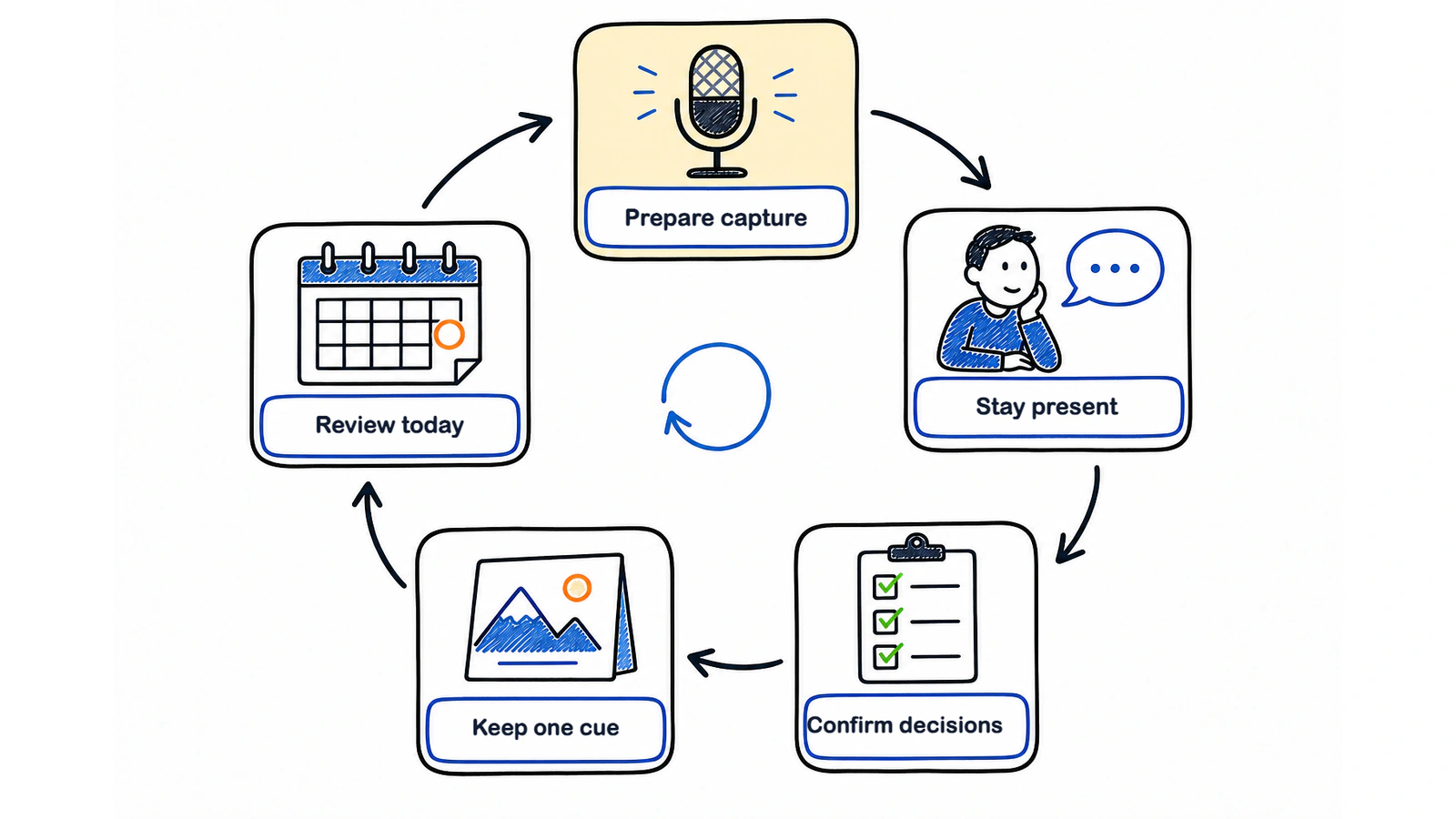
The method is simple enough to use in a weekly check-in and sturdy enough for a project review:
| Moment | What to do | What it protects |
|---|---|---|
| Before | Choose where the recording, decisions and actions will live | Attention from setup decisions |
| During | Listen; write each decision, owner and open question as it happens | Meaning from verbatim note-taking |
| At the turn | Say the decision back before the topic changes | Shared understanding |
| After | Keep one visual cue linked to the full record | Retrieval |
| Same day | Review, correct and schedule the first action | Follow-through |
Why does a whole meeting vanish by the afternoon?
A whole meeting can vanish because your attention had to do too many jobs while the conversation kept moving. You were decoding what one person said, comparing it with what you already knew, watching for disagreement, deciding whether to speak, and perhaps typing at the same time. A new topic arrived before the previous one had settled.
That pressure compounds across the day. Microsoft's 2025 Infinite Workday report found that half of meetings in its dataset fell into two dense windows, 9–11 am and 1–3 pm. Slack's 2023 Workforce Index, a survey of 10,333 desk workers in 6 countries, found that beyond 2 hours of meetings a day, most respondents said they were in too many.
Video adds its own cost. In a 2023 laboratory study of 35 university students, a 50-minute videoconference lecture produced EEG and heart-rate-variability patterns consistent with more fatigue than the equivalent in-person session. Riedl and colleagues measured a narrow lab condition, not every Zoom call, but the result matches a familiar afternoon: your body is still in the chair while the thread becomes harder to hold.
There is also an older warning worth treating carefully. Nichols and Stevens reported in 1957 that people in their listening tests retained about half of a talk immediately and about a quarter 2 months later. The methods are thin by today's standards, so those figures are not a universal law. The useful part is less dramatic: hearing something once has never been a dependable filing system.
Is it just me?
No. A long, crowded or poorly structured meeting can ask your attention to do three jobs at once: follow an argument, evaluate it and store it. The studies above establish workload and fatigue in specific settings; they do not establish how common your exact experience is.
The practical problem often appears at the handoff between understanding and storage. You may follow the argument or record the sentence, but doing both at full fidelity is difficult. That is a workflow problem worth reducing before treating it as a personal failure.
If you have ADHD or another attention difference, the friction may feel sharper. This article cannot diagnose it, and a productivity routine is not medical advice. Reduce simultaneous tasks, make the agenda a visible re-entry point, capture exact words elsewhere, and record decisions as they are made. If attention problems are persistent across settings or disrupt daily life, seek advice from a qualified health professional.
Why doesn't “take better notes” work?
“Take better notes” fails when it means “write more while listening.” A near-verbatim transcript can be complete and still leave you unsure what changed.
The familiar claim that handwriting always beats typing does not survive later research. A direct replication by Urry and colleagues in 2021, together with its 8-study mini-meta-analysis, did not support an immediate learning advantage for longhand. A 2019 review by Morehead, Dunlosky and Rawson also found no consistent winner. The more useful distinction is between processing and transcribing. “Budget approved if legal signs off” is processed. Four paragraphs around that sentence are storage.
The notes nobody reopens have another problem: they are not part of the team's operating system. A 2022 Otter.ai and Steven Rogelberg survey of 632 US employees found that respondents wanted to decline 31% of invitations but declined only 14%; 71% said timely, high-quality notes would let them skip more meetings. This is a small vendor survey, but it reveals what people trade at work. The durable unit is not “I remember being there.” It is a record another person can trust.
Good notes therefore have a job. They identify the decision, who owns the next move, when it is due, what remains open and where the evidence sits. Anything else is optional detail.
Which five moves actually help you remember meetings?
Five moves work together: delegate exact capture, write decisions immediately, say them back, keep one visual cue and revisit the record the same day. None asks your memory to carry the whole meeting alone.
1. Stay present by delegating exact capture
Use a recording or transcript when the meeting and local rules allow it, and tell participants clearly. The capture stores exact wording while you continue to follow the argument, notice the turn and ask the question that prevents a bad assumption.
If recording is not appropriate, appoint one note owner and rotate the role. Shared capture is still better than 8 people each making a partial private transcript.
2. Write the decision when it becomes a decision
Do not wait for “any other business.” Write one sentence as soon as the group commits: Decision: launch remains on Thursday if the payment test passes by 3 pm Wednesday. Under it, write the owner and next action. This preserves the condition as well as the headline.
3. Say the decision back before the topic changes
Use a sentence that can be corrected in the room:
“Before we move on: the decision is Thursday, Maya owns the payment test, and we reopen the date only if it fails by 3 pm Wednesday. Is that right?”
This brief check lets everyone correct the wording before they leave with different versions.
4. Keep one visual cue per meeting
Choose one frame that will make the meeting recognisable tomorrow: a branch map of 3 options, a simple before-and-after, a customer path with the blocked step, or a one-page Visual Note with the decision at the centre. One useful cue beats a gallery of decorative slides.
The evidence needs careful wording. Shepard's 1967 experiments helped establish that pictures are often recognised better than equivalent words. Wammes, Meade and Fernandes found a drawing advantage across 7 laboratory experiments, and a 2007 meta-analysis of the generation effect found that material people produce themselves is remembered better than material they only read. These findings do not prove that any AI-made infographic improves meeting memory. They do support a routine that pairs a relevant picture with active processing.
5. Revisit while the context is still warm
Open the record later the same day. Murre and Dros's 2015 replication supports the shape of Ebbinghaus's forgetting curve: forgetting is steepest early and then flattens. It does not support the popular claim that everyone forgets a fixed percentage after 1 hour or 24 hours.
Run a focused review. Check the decision, owner, due date and first action. Correct names. Link the source document. Send the part another person needs. The goal is not to study the meeting; it is to make tomorrow's work unambiguous.
How do I build a meeting-memory routine that sticks?
Build the routine around moments that already exist: opening the agenda, hearing a decision and closing the meeting. A separate “organise my notes” habit usually loses to the next call.
| When | Routine | Example from a working week |
|---|---|---|
| Before | Open one page with the goal, agenda and decision area; start agreed capture | Monday project review: “Choose beta date” is at the top |
| During | Add only decisions, owners, due dates and unresolved questions | Maya owns payment test; due Wed 3 pm |
| Topic change | Read the decision back | Team confirms Thursday is conditional |
| After | Attach one visual cue and link the full transcript | Branch map shows launch, delay and rollback paths |
| Same day | Correct the record and move actions into the task system | Maya receives the test task; PM links the decision |
| Before next meeting | Scan the visual and open actions, not the whole transcript | Thursday check-in starts with payment result |
Try it for one recurring meeting before changing your entire calendar. On Monday, use it in the project review. On Tuesday, open only the visual cue and decision record to write your status update. On Wednesday, check the owner and due date. On Thursday, start the next meeting from the unresolved condition. On Friday, delete clutter but keep the decision and source.
Preparation matters because a clear question gives your attention something to organise around. The companion guide, How to prepare for a meeting in 15 minutes, shows how to set the goal, evidence and decision before people join.
What should the one visual cue look like?
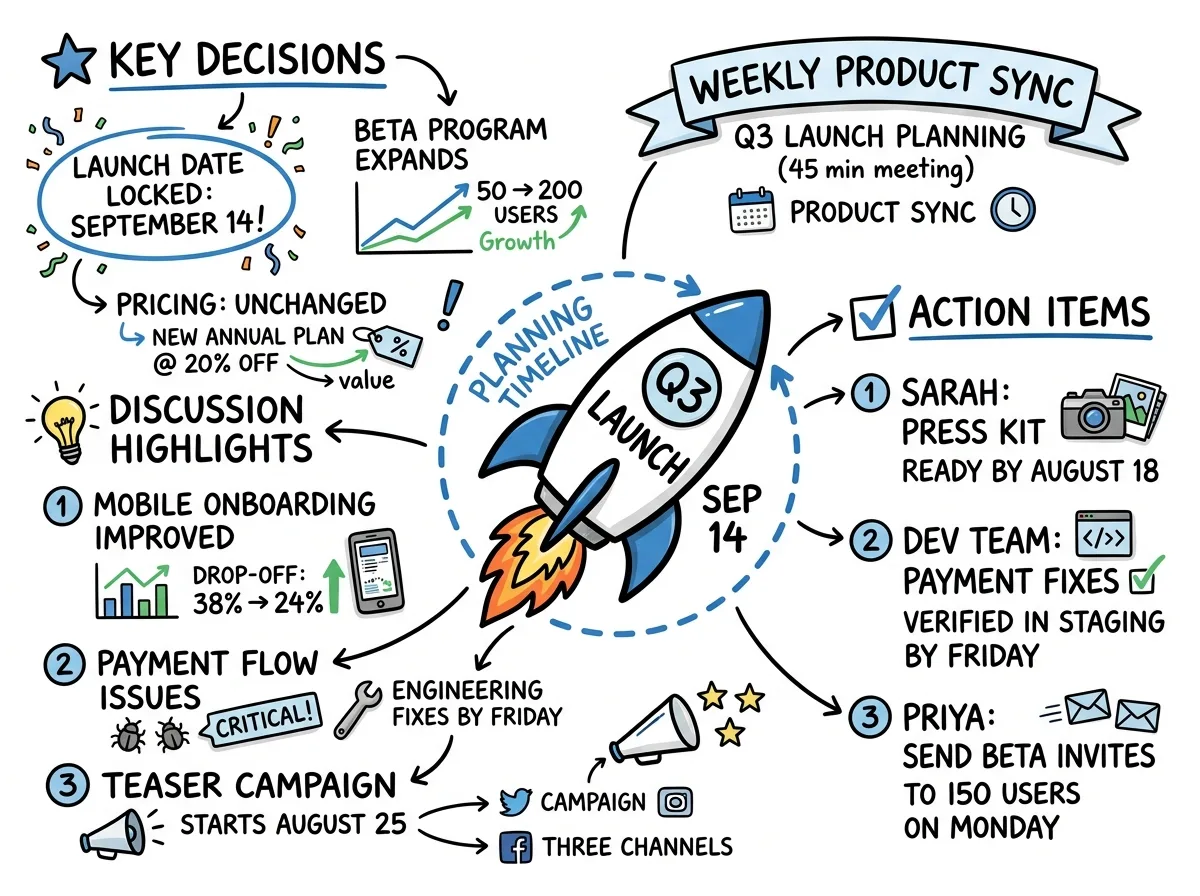
The one visual cue should show the meeting's structure at a glance: the goal, the paths considered, the decision, the owner and the next move. It does not need to reproduce every comment.
Check it with 3 questions:
- Can you find the decision at a glance?
- Can you see who moves next and what they will do?
- Can you tell where to open the exact wording or evidence?
A mind map works when the discussion branches around a central question. A flow diagram works when sequence and handoffs matter. A comparison works when the meeting weighs options against criteria. The guide What are visual meeting notes? explains the category, while Which visual fits which meeting? helps choose the shape.
Do not make the cue carry legal nuance, detailed figures or disputed wording by itself. Those belong in the time-stamped transcript and written summary. Open the full record from the visual whenever those details matter.
Where does Meeting.ai fit?
Meeting.ai fits by giving each layer of this routine a separate place: capture for presence, an AI-Powered Summary for the record and a Visual Note for the cue. You can record an In-person meeting from a phone on the table or in the browser, or send the Meeting Bot to Google Meet, Zoom or Microsoft Teams. Participants should still know that the meeting is being recorded.
After processing, the searchable, time-stamped transcript preserves the exact conversation. The summary pulls out key points, decisions and action items. The Visual Note turns the shape of the discussion into one page. And when a later project review blurs into the previous one, you can ask the agent, “What did we decide about the payment test?” and trace the answer back to its meeting source.
That arrangement does not make memory irrelevant. It gives memory a smaller, more useful job: recognise the cue, recover the context and continue the work. See Meeting.ai Notes to try the workflow with one meeting.