
You can get a mind map from a meeting automatically in one step: record the meeting — a bot for Zoom, Google Meet or Microsoft Teams, or your phone on the table for an in-person meeting — with a tool that draws the map from the transcript; Meeting.ai, Plaud and Lilys AI do this, and Mapify or MyMap will do it if you paste the transcript yourself.
A useful map puts the meeting's purpose in the middle, groups the discussion into a few themes, and gives decisions, action items, owners, and dates visible places. The full transcript remains underneath as the evidence when a branch looks wrong.
For the shortest workflow, use one tool to record, transcribe, and draw. If your company already has a transcript, a paste-a-transcript tool is a sensible second path. Draw the map manually when the act of arranging ideas is part of your thinking, or when the meeting is too sensitive to upload.
What are the three ways to turn a meeting into a mind map?
There are three practical methods: create the map automatically from the recording, paste an existing transcript into a mind-map tool, or draw the branches yourself during the meeting.
| Method | What you need | Steps | Time | In-person? | Where it breaks |
|---|---|---|---|---|---|
| Automatic from recording: Meeting.ai, Plaud, Lilys AI | A live call, audio file, or phone recording | Record → transcribe → map | One setup, then processing | Yes, when the tool accepts phone or recorder audio | Noisy audio, overlapping voices, unclear decisions, frequent language switching |
| Paste a transcript: Mapify, MyMap, NoteGPT | A complete transcript that you can copy or upload | Transcribe elsewhere → clean text → paste → map | Transcription plus a second tool | Yes, if you can make the transcript first | Missing speaker context, copied text limits, extra cleanup |
| Manual live mapping: MindMeister, Xmind | A blank map and someone assigned to maintain it | Set agenda branches → take notes → tidy and share | The whole meeting plus cleanup | Yes | The mapper misses discussion while arranging nodes; detail can outrun the map |
MindMeister's manual method starts with a blank map before the call: put the meeting title in the centre and add one branch for each agenda item. That is still a good planning method. But it gives one participant two jobs at once: listen closely and decide where every new point belongs.
The automatic route changes the order. Everyone talks first. The transcript captures the sequence, then the map compresses it into a hierarchy. Mapify's transcript workflow and tools such as MyMap sit one step later: they are useful when the transcript already exists.
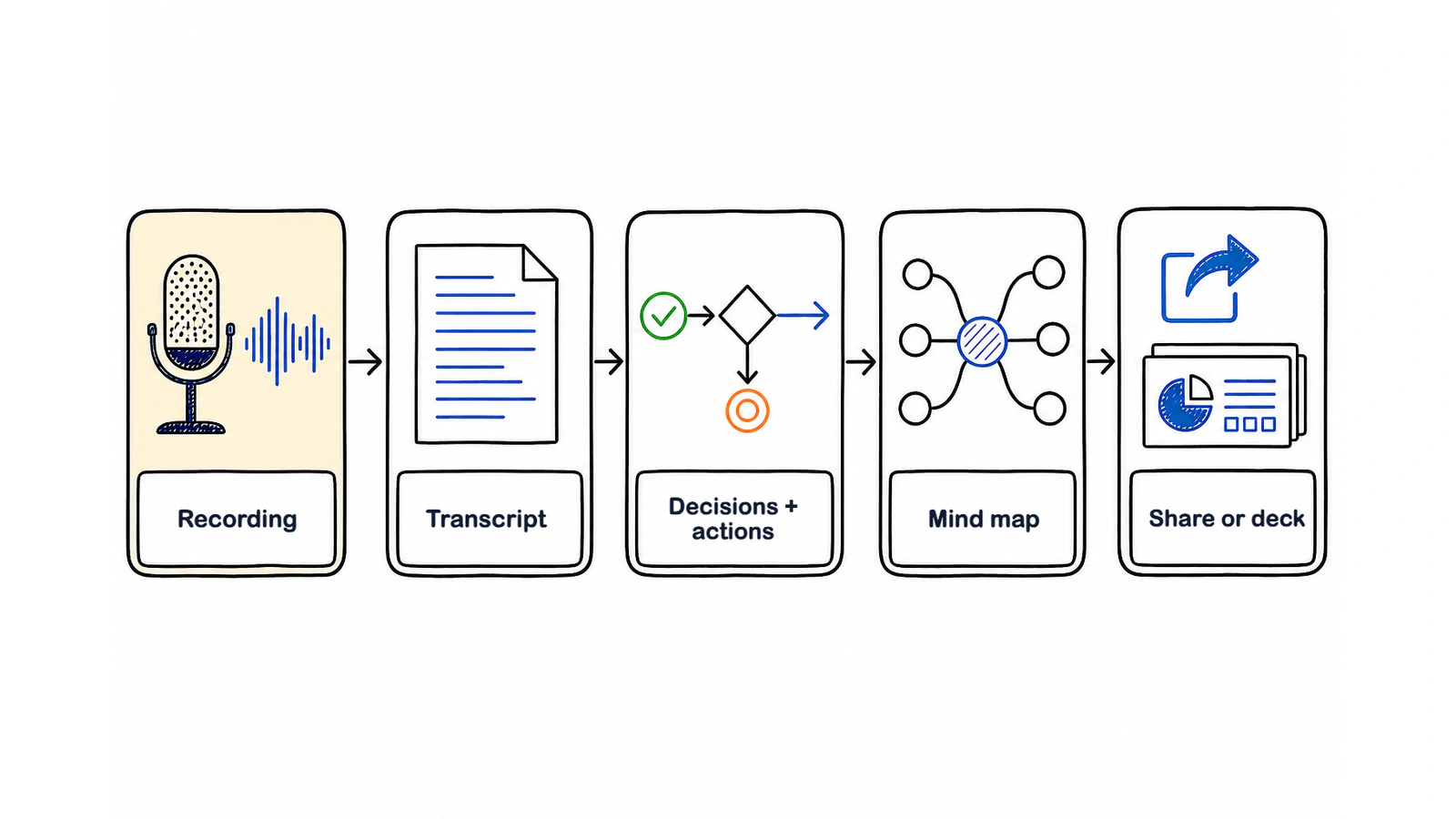
Pick the path based on what you already have: raw audio needs recording and transcription; clean text only needs mapping; a sensitive or highly exploratory conversation may deserve a human mapper.
How do I make a mind map from Zoom, Google Meet, or Microsoft Teams?
Use a Meeting Bot to join the online call, transcribe it, and create a Visual Note after the meeting.
- Open Meeting.ai and connect or add the meeting you want recorded.
- Send the Meeting Bot to the Zoom, Google Meet, or Microsoft Teams call. Make sure its name is visible in the participant list and follow your organisation's recording policy.
- Run the meeting normally. State decisions plainly: “We chose option B,” “The account lead owns the draft,” and “The deadline is confirmed in the project calendar” are easier to map than an implied agreement.
- When processing finishes, open the time-stamped transcript and AI-Powered Summary first. Check names, numbers, decisions, and dates.
- Open the Visual Note. Look for one central purpose, a small set of topic branches, and leaves for decisions and action items.
- Share the Visual Note only after the owners recognise their commitments.
The Meeting Bot guide covers setup. You can also upload a saved audio or video file when the bot was not present. What matters is whether the transcript preserved enough context to separate discussion from an actual decision.
In the result, headings should do more than mirror the agenda. A branch called “Launch date” should show what was decided, who owns the next task, and which question remains open. If it only says that the team “discussed timing,” the map needs another pass.
Very long meetings benefit from a clear scope. Ask the agent for the map around a particular decision, project phase, or customer problem instead of asking one canvas to carry hours of unrelated discussion.
How do I make a mind map from an in-person meeting?
Put your phone near the middle of the table, start an In-person recording, and tell everyone in the room before the discussion begins.
A soft table, an open laptop fan, and side conversations can all muddy the recording. Place the phone on a stable surface, away from cups and paper, and close enough to the quietest speaker. In a large room, test a short recording before the agenda starts. The record and upload guide explains the capture options.
“I’d like to record this so we can produce an accurate recap and mind map. Is everyone comfortable with that?”
That sentence is a useful start, but consent law and company policy depend on where you are and who is present. Read the separate guide on whether it is legal to record a meeting and follow the rule that applies to the call.
Ask people to say their name once if Voice Match has not learned them yet. It labels who said what, but clean turn-taking still matters. When two people talk over each other, the safest response is to check that part of the transcript rather than trusting a neat-looking branch.
After the meeting, review the map in this order:
- Confirm each decision against the transcript.
- Confirm every action item has an owner.
- Confirm dates and numbers from the exact timestamp.
- Remove side conversations that do not affect the outcome.
- Share the map with the room while the context is still fresh.
For a fuller recording checklist, see how to record an in-person meeting with your phone.
What should a meeting mind map actually contain?
A meeting mind map should contain the meeting's purpose at the centre, themes or agenda items as branches, and decisions, action items, owners, dates, evidence, and open questions as leaves.
Imagine a product launch meeting. “Launch the reporting feature” is the central node. The main branches might be “Scope,” “Readiness,” “Customer communication,” and “Risks.” Under “Customer communication,” one leaf says “Decision: announce to beta customers first.” Another says “Owner: Hana.” A due-date leaf points to the confirmed project calendar. The raw debate about discarded subject lines stays in the transcript unless it explains the final choice.
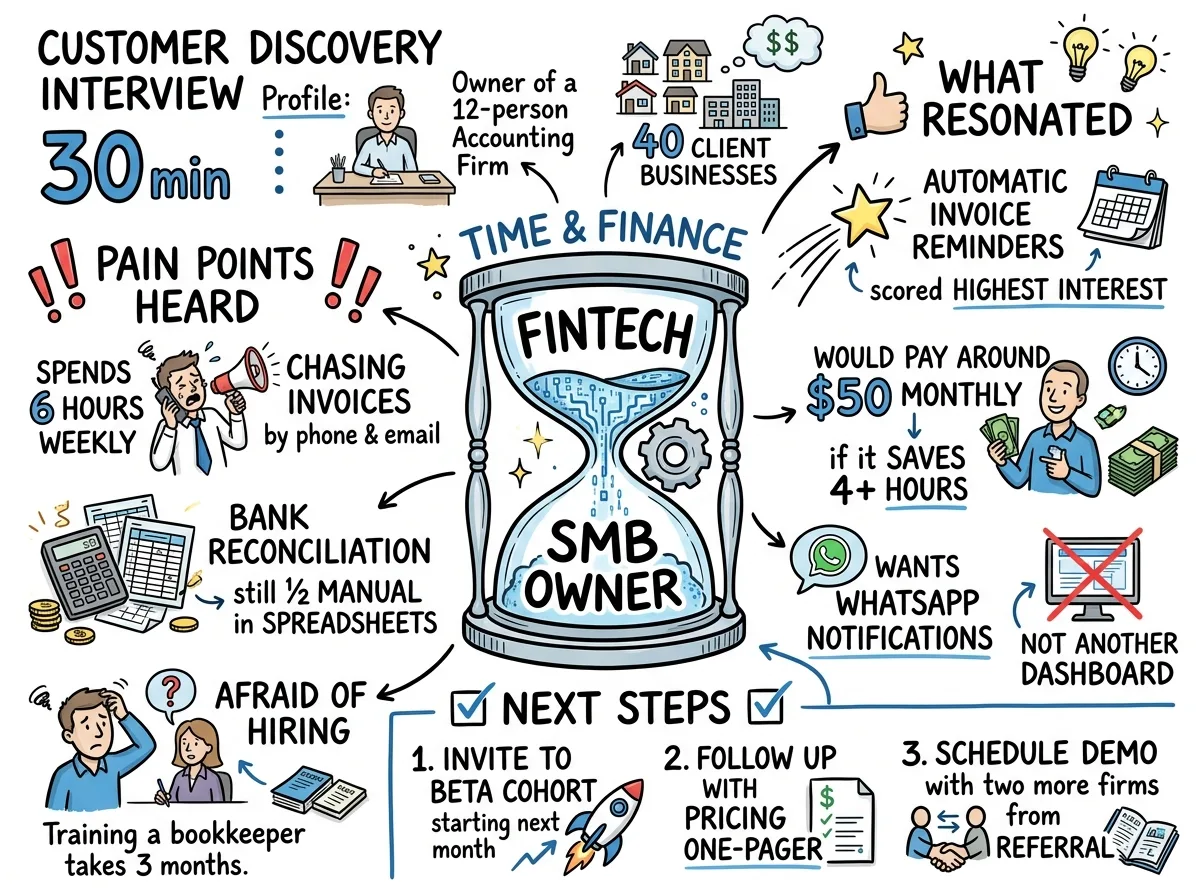
Use this test for every node: will someone act, decide, verify, or understand the relationship because this node exists? If not, it may be clutter.
Keep these items:
- the purpose or question the meeting had to resolve;
- the few themes that organised the discussion;
- decisions, including rejected options when the reason matters;
- action items with one clear owner and a date when one was stated;
- risks, dependencies, and unanswered questions;
- links or timestamps for claims that need evidence.
Leave out greetings, repeated agreement, verbal filler, and tangents that changed nothing. Keep those details in the transcript so the map stays focused on outcomes.
There is research behind the structure, but it needs careful wording. A 2018 meta-analysis covering 142 effect sizes found a moderate learning benefit for concept maps, with a larger effect when people built the maps themselves than when they only studied a finished map. That supports reviewing and rearranging an AI draft. It does not prove that any automatic map is accurate.
When is a mind map the wrong shape for a meeting?
A mind map is the wrong shape when order, status, or comparison matters more than relationships among ideas.
A process review with several handoffs is easier to understand as a flow diagram because each step has a direction. A daily status meeting often needs a list or table: item, state, owner, blocker, next move. A vendor evaluation needs a comparison grid. Forcing all three into branches hides the property the reader needs to see.
Use a mind map for discovery, planning, interviews, workshops, retrospectives, and discussions where several themes connect to one central question. Use a flow for sequences and dependencies. Use a list for a short operational recap. Use a timeline when dates and order are the story.
The practical decision is covered with examples in which visual fits which meeting. If you are unsure, write the question a reader will ask after the meeting. “What connects to this decision?” suggests a map. “What happens next?” suggests a flow. “Who owes what?” suggests a list.
How do I check that the AI mind map is right?
Check the AI mind map against the time-stamped transcript, starting with decisions, owners, dates, numbers, and negation.
Negation deserves special attention. “We are not shipping on Friday” must not become “Ship on Friday.” So do corrections: if the group first chose option A and later replaced it with option B, the map should show the final decision and keep the earlier option only when the reason matters.
Run this short verification pass:
- Read every decision leaf and open its supporting timestamp.
- Ask each named owner whether the action matches what they accepted.
- Search the transcript for dates, percentages, amounts, and proper names.
- Mark unresolved questions as open; do not let the layout make them look settled.
- Remove branches that contain discussion but no useful outcome.
Regenerate or narrow the map when the meeting switched frequently among three or more languages, several people spoke at once, the room was noisy, or the call ran across unrelated agendas. Do not “fix” uncertainty by inventing a cleaner answer. Keep the questionable branch linked to the transcript or leave it open.
How do I share and reuse a meeting mind map?
Share the Visual Note as the quick recap, then reuse the verified meeting context to make the next work artifact.
Send the map with one sentence that says what the recipient should do: “Please check your owner and due date by the end of the day,” or “Use the Risk branch for tomorrow’s launch review.” A naked attachment makes people guess. A short instruction turns it into a working document.
Meeting.ai keeps the searchable transcript, AI-Powered Summary, and Visual Note together. After you verify them, ask Memo to draft the follow-up email, create an editable PPTX deck, build an XLSX tracker with formulas, or produce PDF minutes. The map becomes the outline; the transcript supplies the detail and exact source.
For a later meeting, ask the agent what changed since this map was made. The answer should point back to the relevant meeting evidence. This is more reliable than copying old branches into a new canvas and hoping somebody remembers which assumptions expired.
See meeting notes and Visual Notes for the full before, during, and after workflow.
Does an automatic meeting mind map work in my language?
Meeting.ai transcribes more than 30 languages, and the AI-Powered Summary and Visual Note follow the language used in the meeting.
Supported transcription languages include English, Indonesian, Malay, Japanese, Korean, Simplified and Traditional Chinese, Arabic, Bulgarian, Catalan, Croatian, Czech, Danish, Dutch, Finnish, French, German, Greek, Italian, Norwegian, Polish, Portuguese, Romanian, Russian, Slovak, Spanish, Swedish, Thai, Turkish, Ukrainian, and Vietnamese.
Names, product terms, and mixed-language decisions still need human review. If the team uses English feature names inside a Japanese or Indonesian discussion, check that those terms remain attached to the right owner and decision. When a meeting jumps among three or more languages, make a narrower map around one topic or language segment and compare it with the transcript.
The shortest dependable workflow is simple: record in the language people naturally use, let Meeting.ai produce the transcript and Visual Note, then verify the few branches that can change what somebody does next.