

Upload the recording to a meeting AI, let it transcribe in the meeting's language, then pick the minutes format you need. The workflow produces a transcript, a summary with decisions and action items, and a one-page visual without retyping; here is how to check the result before you send it.
The shortest reliable route is recording → transcript → checked summary → formal minutes. Keep the transcript as evidence, but do not send it as the minutes. Minutes are the compact record people use to confirm what was decided, who owns the next step, and when it is due.
Meeting.ai accepts audio or video uploads and YouTube links. It creates a time-stamped transcript, an AI-Powered Summary, and a Visual Note. You can then ask Memo for a DOCX or PDF using your organisation's headings. Test the workflow with a representative recording before relying on it for a formal or recurring meeting.
Useful minutes capture purpose, decisions, owners, dates, and unresolved questions; the transcript preserves every spoken word.
What must meeting minutes contain?
Useful meeting minutes contain 6 things: the meeting identity, purpose, attendees, decisions, action items, and open questions.
The meeting identity covers the title, date, time, place or call link, and chair. The purpose explains why the group met. The attendee list shows who could make or accept decisions. The final three elements carry the work forward: decisions as agreed, each action with an owner and due date, and any question that still needs an answer.
You do not need a polished narrative. A repeatable template makes gaps obvious:
Meeting:
Date, time, and location:
Chair and attendees:
Purpose / agenda:

Discussion:
- Topic — the context needed to understand the outcome

Decisions:
- Decision — approved by / conditions, if relevant

Action items:
- Owner — deliverable — due date

Open questions:
- Question — person responsible for resolving it — target date
Separate discussion from decisions. “The team discussed delaying launch” is not the same as “Launch moved to 14 September.” And “Check supplier capacity” is incomplete until it says who will check, what answer they must bring back, and by when. For a deeper format guide, see how to write meeting minutes.
What are the three ways to turn a recording into minutes?
The 3 practical routes are a meeting AI, a generic transcription tool followed by manual editing, or fully manual listening and writing.
| Route | Tools | Main time drivers | Speaker labels? | Output | Best for |
|---|---|---|---|---|---|
| Meeting AI | Recording upload plus meeting-aware AI | File length, upload and processing conditions, audio quality, and human review | Yes, when speakers are identified and checked | Transcript, summary, decisions, actions, Visual Note, document export | Recurring work meetings where follow-through matters |
| Transcribe, then write | General transcription service plus a document editor | Service processing, manual structuring, and review | Depends on the service | Transcript plus minutes you structure yourself | Sensitive formats or teams with a strict house template |
| Manual | Media player, headphones, document template | Recording length, replaying unclear sections, drafting, and review | You identify everyone | Human-written minutes | Poor audio, formal review, or a recording that needs close interpretation |
Choose based on the final record, not the novelty of the tool. If you need only a searchable transcript, generic transcription may be enough. If you need decisions and owners before the next workday, a meeting-aware tool removes the first drafting pass. If the meeting changes legal obligations or contains a disputed decision, plan for careful human review whichever route you use.
The recording quality sets the ceiling. A phone buried under papers, 3 people speaking at once, or a distant conference-room speaker will make every route slower. Before upload, keep the original file and note any names or abbreviations that the software is unlikely to know.
How do I upload a recording and get minutes?
Upload the audio or video file, or paste a YouTube link, then review the transcript before turning the generated summary into a document.
- Keep the original. Save an untouched copy with a useful name such as
2026-08-22-product-review.m4a. - Open the upload flow. Follow Record and upload, add the file or YouTube link, and select the meeting language when asked.
- Identify the voices. Use Voice Match to confirm who said what. Correct swapped or unknown speakers before relying on extracted actions.
- Read the AI-Powered Summary. Check the key points, decisions, and action items against the transcript timestamps.
- Scan the Visual Note. Use the one-page view to spot a missing topic or an outcome that received too much weight.
- Request the final format. Ask Memo for “formal meeting minutes as DOCX, with attendees, decisions, action owners, due dates, and open questions.” Choose PDF when the record is ready to circulate.
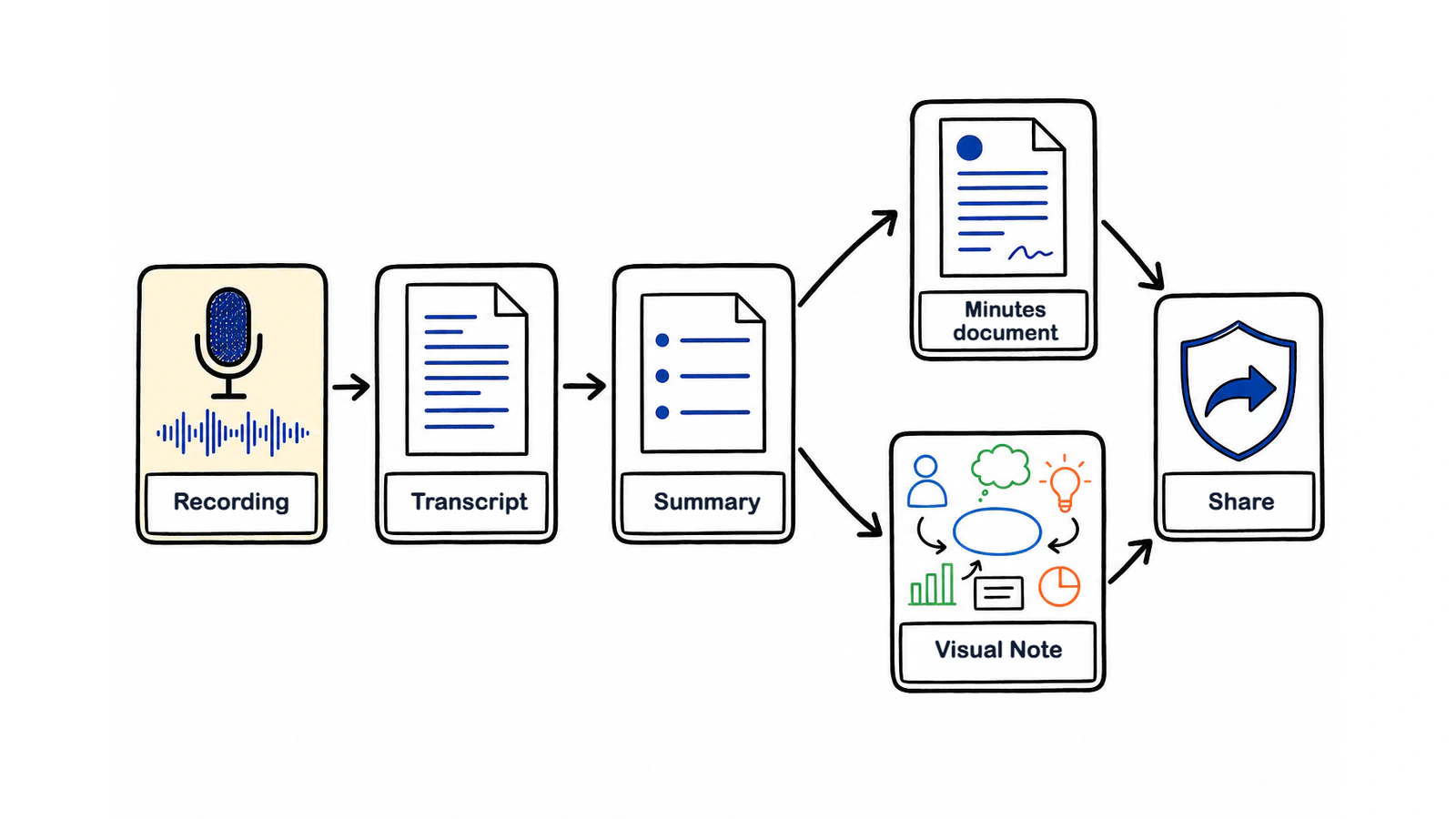
The Visual Note reveal below shows the summary becoming a one-page visual. It is a second way to inspect the meeting, not a replacement for the detailed minutes.
Do not correct every filler word. Focus first on the passages that change the record: approvals, rejections, quantities, dates, named owners, and conditions. That is where a small transcript error becomes a real work error.
What should I test before choosing a tool?
Choose from the finished record, not a feature list. Upload one representative recording, correct the names, generate your normal minutes format, and open the exported file.
| Capability | Test with your own meeting | Reject the workflow if |
|---|---|---|
| Transcription | Check names, numbers, dates, and overlapping speech | Critical passages cannot be found or corrected |
| Speaker labels | Rename two speakers and reopen the record | Corrections disappear or are hard to audit |
| Summary | Compare proposals, decisions, and action items with the transcript | A suggestion is presented as an approved decision |
| Exports | Open the required DOCX or PDF and edit one section | The document loses headings, tables, or editable text |
| Language handling | Test the team's normal language and code-switching | Names or owners move to the wrong sentence |
Meeting.ai supports transcription across 30+ languages and Memo can create editable DOCX documents and PDFs. A real-file test still matters because no feature list can predict your room acoustics, vocabulary, or house template.
Avoid choosing from an “unlimited” label alone. Check maximum file size, per-recording duration, storage, export restrictions, and deletion controls on the day you sign up. These terms change, which is why this guide does not freeze a price or allowance into the article.
How do I turn the summary into formal minutes?
Turn the summary into formal minutes by giving the agent your required headings, telling it what counts as a decision, and requiring an owner and date for every action.
A useful prompt is concrete:
Create formal meeting minutes from this recording as a DOCX. Use these headings: Meeting details, Attendees, Agenda, Discussion, Decisions, Action items, and Open questions. Put action items in a table with Owner, Deliverable, and Due date. Do not invent missing owners or dates; mark them “To confirm.”
That final sentence matters. A blank is safer than a confident guess. If the source says “Maya can probably handle the supplier call,” the minutes should not silently turn that into a confirmed assignment. Ask the chair or Maya, then update the document.
Here is a compact example produced from a product review recording:
WEEKLY PRODUCT REVIEW — MINUTES
Date: 22 August 2026, 09:00–09:45
Chair: Maya Chen
Attendees: Maya Chen, Luis Ortega, Priya Shah, Noah Williams
Purpose: Decide whether the onboarding update is ready for pilot.

DECISIONS
1. Run the pilot with the customer-success team on 26 August.
2. Keep the current sign-in screen for this pilot.
3. Review completion data before wider release.

ACTION ITEMS
- Priya — send the pilot build and test steps — 24 August
- Luis — recruit 8 pilot participants — 25 August
- Noah — prepare the completion dashboard — 28 August

OPEN QUESTION
- Does the revised consent copy need legal review? Owner: Maya. Due: To confirm.
The format is short because the transcript holds the detail. If someone disputes why the sign-in screen stayed, use the timestamped transcript to recover the discussion. The minutes themselves should stay focused on the agreed result.
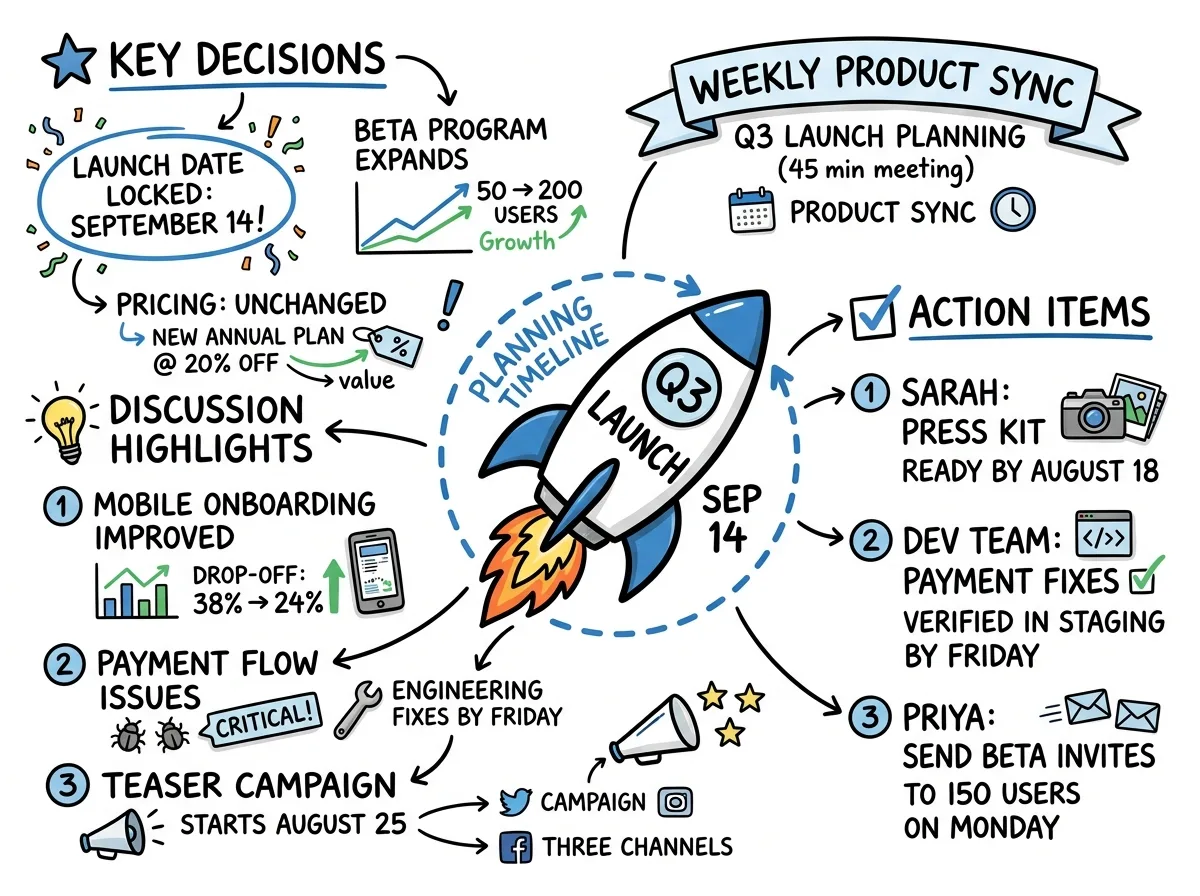
Use Meeting.ai notes for the transcript, AI-Powered Summary, and Visual Note, then ask the agent for the file your team already uses. You do not need to teach colleagues a new minutes format to improve how it is produced.
How do I check the minutes before sending?
Check names, numbers, decision wording, owners, and dates against the recording before you send the minutes.
Start with a fast scan of the whole document. Does every agenda item appear? Are discussion notes accidentally presented as decisions? Does each action say who, what, and when? Then listen to the 3 kinds of moments that matter most:
- The decision moment. Play the sentence before and after each approval, rejection, or change. Conditions often sit beside the headline decision.
- The commitment moment. Confirm that the named person accepted the action. A suggestion about who could do it is not ownership.
- The precision moment. Replay every amount, percentage, date, product name, and person's name. These are easy to mishear and costly to get wrong.
Next, remove material that does not belong in minutes: repeated arguments, filler, unrelated chat, and unconfirmed guesses. Keep enough context to explain a decision without reproducing the room word for word.
Send the draft to the chair or designated reviewer when the record is formal. Give attendees a clear correction window, such as “Please reply with factual corrections by 15:00 tomorrow.” That invitation is for accuracy, not for reopening a decision the group already made.
Does it work for recordings in my language or mixed languages?
Meeting.ai transcribes 30+ languages, including English, Indonesian, Korean, Malay, Japanese, and both Simplified and Traditional Chinese, and the summary follows the meeting's language.
Set the main language to the one used for most of the meeting. Names, internal acronyms, product terms, and code-switching deserve extra review. A Malay meeting may contain English finance terms; an Indonesian meeting may switch into English for product names; a Korean meeting may include English abbreviations. Keep those words in the form the team actually uses instead of forcing a translation.
Mixed-language meetings are harder than a clean single-language recording. The practical approach is to check every switch in the transcript, correct proper nouns first, and tell the agent which language the final minutes should use. If a participant gives a long answer in another language, verify that passage with a fluent reviewer before treating its summary as final.
Keep the original meaning when localising the minutes. A translation should not turn a tentative option into a commitment or soften a clear rejection. When the exact wording matters, include the original phrase beside the translated decision.
Where does the audio go, and is it private?
Meeting.ai encrypts meeting content in transit, protects it with access controls, never sells it, and does not use identifiable meeting content to train publicly available, general-purpose AI models except with your consent or as permitted by law.
You remain in control of the file. From the meeting page, you can delete the recording while keeping the transcript and notes. You can also set processed recordings to delete automatically after a number of days you choose; unfinished or failed recordings are kept so they are not lost mid-process. Read Your privacy before setting a retention rule for your team.
Privacy starts before upload. Tell people you are recording and get the agreement required where the participants are located. A voice memo exported from WhatsApp or a recording downloaded from Zoom still contains other people's words. Moving the file does not remove your duty to handle it carefully.
If you are unsure whether you can record or share a particular meeting, pause and check the rules that apply. Our guide to whether it is legal to record a meeting gives a practical starting point, but sensitive employment, legal, health, and board matters may need advice from your organisation.
How should I review a 45-minute recording?
A 45-minute recording still needs a deliberate human review. The time varies with audio quality, speaker overlap, the number of decisions, and the formality of the record. Use the same verification order rather than promising a fixed duration.
Imagine the product review above has finished transcribing before you begin:
- Scan the structure: read the AI-Powered Summary and compare its decisions with the Visual Note.
- Verify the evidence: open the transcript at each decision and listen to the surrounding lines.
- Check accountability: confirm every action owner, deliverable, and date; mark the legal-review date “To confirm.”
- Inspect the document: ask Memo for the DOCX using the team's standard headings, then open it and check the table.
- Send for approval: export the final PDF or send the editable DOCX to the chair.
The result is brief enough to use and traceable enough to trust. Keep the transcript for the exact wording, keep the Visual Note for a fast scan, and send the minutes as the working record. When the retention period ends, delete the recording and preserve only what your team needs.