

The AI note taker that does the follow-up work
Meeting.ai takes notes in person and on Google Meet, Zoom, or Microsoft Teams — then turns them into decks, documents, spreadsheets, and PDFs.
Used by professionals at
- Amazon
- PwC
- L'Oréal
- Telkomsel
- Oracle
- Roche
- Gojek
- Samsung
- Accenture
- Pertamina
- Deloitte












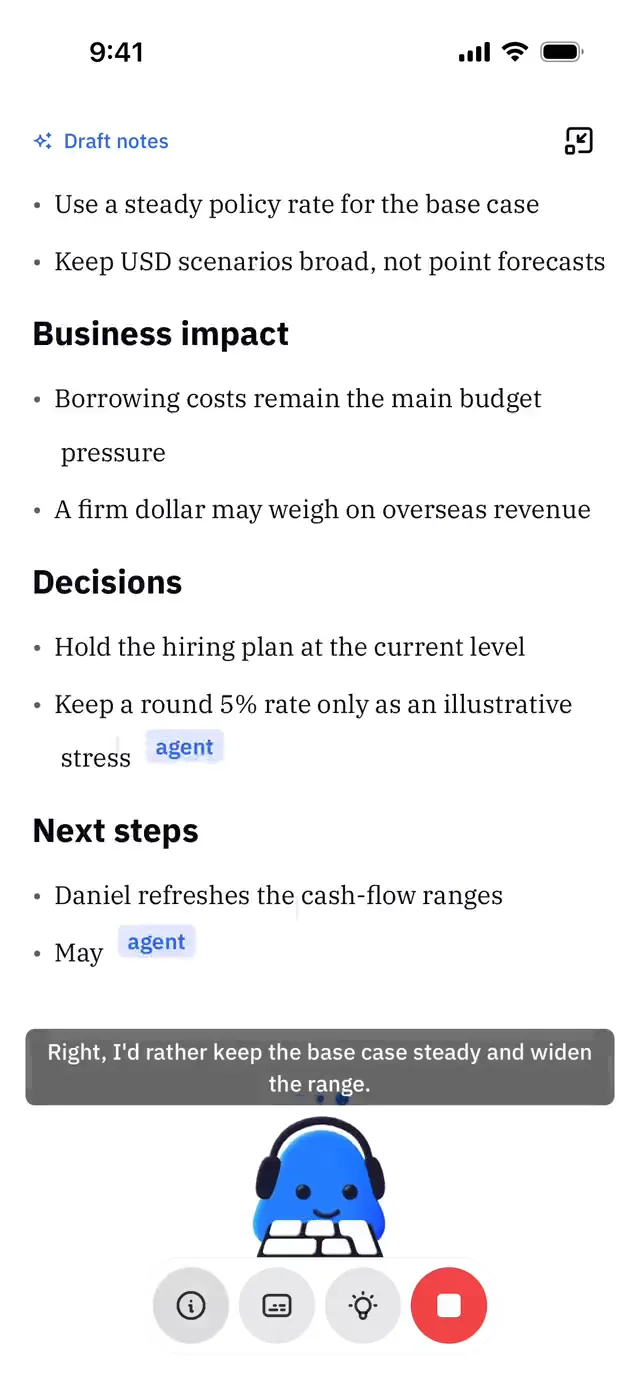
This AI writes the meeting minutes with visuals
Most of the time you don't reread a meeting — you just need one small trigger to remember it. That's the Visual Note: a one-page infographic of what was said and decided. Understand the meeting at a glance and share it with your team — made for visual people.
- 700,000+professionals
- 4.8/515,000+ ratings
- 30+languages supported

How Meeting.ai works
Before, during, and after your meeting.
Record
Send the bot to Zoom, Google Meet or Microsoft Teams, or put your phone on the table for in-person meetings.
95% accurate transcripts · 30+ languages
Get the notes
Transcript, summary, action items and a one-page Visual Note.
Get the follow-up done
Ask for the deck, proposal, document or spreadsheet. It's built from what was said.
Works where you meet and where you work
Records
- Zoom
- Google Meet
- Microsoft Teams
- In-person meetings
- Audio and video uploads



Connect your Google or Microsoft calendar to bring your meetings together.
Use your meetings in your AI tools
Bring meeting context into your AI tools with MCP, or work from your terminal with the CLI.
- Claude app
- ChatGPT app
- Cursor editor



What professionals say
Meeting.ai is a game-changer for my team. Automatically transcribes our meetings with amazing accuracy, and the summaries and key points are incredibly helpful. It's like having a personal assistant that takes care of everything.
Meeting.ai has significantly improved our meeting efficiency, letting us create accurate minutes in no time. It captures the key points of every conversation, which helps us make better decisions.
The only AI transcription that truly understands different accents and language switching, 99% accurate across multiple languages. Exceptionally useful for our team. Highly recommend!
Real reviews from Meeting.ai users. Some are translated.
Your meetings stay private
Encrypted in transit
Your meeting data is encrypted as it travels.
Never sold
We never sell your meeting data.
Never used to train public AI models
Your meeting content stays out of public AI model training.
Export or delete anytime
You control your data. Export it or delete it whenever you need.
Plans for individuals and teams.
Try your first meeting for free.
Every plan includes meeting notes and your own AI agent
Buying for a team? Talk to us
*Estimates for a typical meeting and a typical document. Long meetings, long decks and detailed research use more coins; repeatable tasks that run through a skill use fewer. Each revision counts as a separate document.
Frequently asked questions
What does Meeting.ai do?
Meeting.ai is an AI note taker that also does the follow-up work — before, during, and after your meetings. Before: it researches the topic and the people you're meeting and drafts your deck. During: it records and transcribes in 30+ languages — in the browser, on your phone, or with a bot in Google Meet, Zoom, and Microsoft Teams. After: it writes the minutes, drafts documents and spreadsheets, and revises your follow-up deck from what was actually said.
How does it help before a meeting?
Hand it a report, last week’s notes, or just the topic. It returns a sourced brief, a ready-to-present deck, and the numbers in a spreadsheet.
Where can it record?
Google Meet, Zoom, and Microsoft Teams via bot; any conversation via browser or mobile app. You can also upload audio or video recordings.
Can I record without a meeting bot?
Yes. Join the call on your laptop as usual, put your phone next to it, and record with the Meeting.ai app. No bot joins the meeting, and you still get the notes, the Visual Note and the follow-up work.
What happens after the meeting?
You get accurate notes and minutes automatically. From there, prompt the AI for documents, spreadsheets, a revised follow-up deck, or a short audio recap — plus answers across your whole meeting history.
What can it create?
Decks (PPTX), documents (DOCX), spreadsheets (XLSX), PDF minutes, research briefs, and Visual Notes — all grounded in what was said in your meetings.
What languages does Meeting.ai support?
Meeting.ai transcribes 30+ languages and handles accents well:
- English
- Spanish
- Chinese (Simplified)
- Japanese
- Korean
- French
- German
- Portuguese
- Arabic
- Indonesian
- Bulgarian
- Catalan
- Chinese (Traditional)
- Croatian
- Czech
- Danish
- Dutch
- Finnish
- Greek
- Italian
- Malay
- Norwegian
- Polish
- Romanian
- Russian
- Slovak
- Swedish
- Thai
- Turkish
- Ukrainian
- Vietnamese
Can I ask about past meetings?
Yes. Ask a question and Meeting.ai answers from your meeting history, with the source meeting linked. The more you record, the more useful it gets.
What are coins?
Coins are how Meeting.ai measures usage. Each plan includes a coin allowance: recording a meeting uses coins by the hour, and creating decks, documents, spreadsheets or research uses coins per file. The plan cards show what your allowance covers in meeting hours.
Can I buy extra coins?
You can buy extra Coins while your subscription is valid.
Is my data safe?
Yes — security and privacy are the most important thing we build. Our entire business relies on your meetings staying private and secure. They are encrypted in transit, protected by strict access controls, and never sold — and we never use your meeting content to train public AI models. You can export or delete your data at any time. The full details are in our Privacy Policy and Trust Center.