
What an AI note taker gives you
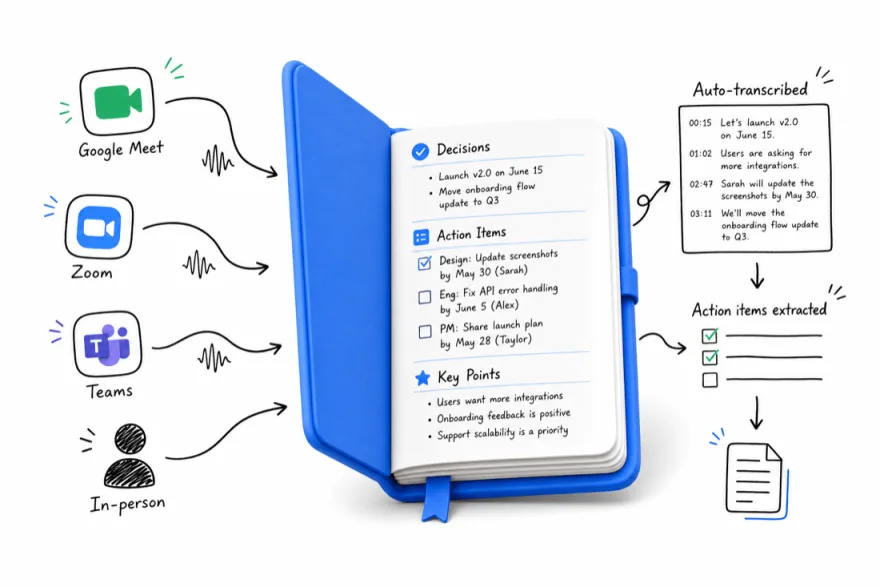
A useful meeting record has three layers. The transcript keeps the conversation in words. The summary helps someone understand the discussion without reading every line. Action items make the next steps visible, with owners and dates where people actually agreed to them.
Those layers answer different questions. If your manager asks what changed, send a summary. If a colleague challenges a detail, return to the transcript. If the team needs to move, review the action list together. A short recap is easier to use when the original context remains available.
Meeting.ai supports transcription with speaker identification across 30+ languages. Check the language and recording setup for the conversations you hold. A supported language does not remove the effect of a noisy room, a quiet speaker, or several people talking at once.
Capture the meeting where it happens
For a room discussion, use the Meeting.ai app on iPhone or Android, or record through the browser. Place the microphone near the group. Make a short test before an important session and listen for the person furthest from the phone. Keep the phone clear of paper, bags, and other objects that can block sound.
For an online call, send the Meeting Bot to the Zoom, Google Meet, or Microsoft Teams meeting. Check that the organizer allows the bot to join. If the call already happened and you have a recording, upload the audio or video instead of trying to reconstruct it from memory.
Tell participants about recording and follow your organization's recording rules. For sensitive conversations, decide who should receive the notes before you share them. An accurate record still needs an appropriate audience.
Review the parts that matter
Read the decisions before you send the recap. A suggestion such as “we could move the launch” should not become “the launch has moved.” Check whether a deadline was agreed or merely proposed. If no owner was named, leave the owner open and ask the team to assign one.
Use a simple review order:
- Check participant names and key terms.
- Confirm decisions against the conversation.
- Check action owners, dates, and amounts.
- Mark unresolved questions clearly.
- Share the version the team has reviewed.
This review is especially useful for client work. People may use a shorthand name in conversation that needs a fuller explanation in a document. Adding that context helps the person who missed the meeting follow what happened.
Use the notes for the next piece of work
Meeting.ai can turn meeting context into editable presentations, documents, PDFs, and spreadsheets with live formulas. For example, ask for a client follow-up deck using the agreed scope and open questions. Read the draft against the notes before presenting it.
A Visual Note puts the discussion into a one-page visual record. That can help a team scan a plan, see the relationship between topics, or revisit a sequence of decisions. Keep the transcript available when a diagram needs more explanation.
Choose a note taker around your week
List the meetings you actually attend: calls, room discussions, field visits, or interviews. Then check capture methods, language support, recording limits, and the work you need afterward. Test a normal meeting with interruptions and unfamiliar names, rather than judging only a short prepared recording.
If your main requirement is desktop capture without a visible bot, compare that feature explicitly. Meeting.ai's published capture methods are the meeting bot, phone or browser recording, and uploaded files. Your choice should fit the way your team meets and the record it needs to keep.
FAQ
Can an AI note taker record in-person meetings?
Yes. Meeting.ai can record an in-person conversation through its mobile app or a browser. Put the phone where it can hear the group, tell participants you plan to record, and check the resulting notes before sharing them.
Which online meeting platforms work with Meeting.ai?
The Meeting Bot joins Zoom, Google Meet, and Microsoft Teams. You can also upload an existing audio or video recording. Meeting.ai does not list Webex as a supported bot platform.
Should I review the notes before sharing them?
A quick review is good practice. Meeting.ai transcribes with 95% accuracy, and a short scan of names, amounts, decisions, and owners before you share keeps the record precise. The full transcript is always there for the exact wording.
Turn your meeting into work
First meeting free